
Viewing faxes
Faxes are delivered in PDF format. If you wish, you can change this to TIFF format from within the Control Panel.
Windows Vista / 7 (all editions) | Mac OS X | Windows XP
Viewing PDF’s:
There are a lot of PDF viewers out there, however we recommend using the de facto standard viewer Adobe Reader. It can be downloaded for free here
Viewing TIFF’s:
Windows Vista and 7 replaces XP's Picture and Fax viewer with Windows Photo Viewer. Despite it's name it is perfect for the job. By default it is associated with TIFF files, so things should work right away. However, if another application has taken over handling of TIFF files, you'll need to save the file to your hard disk and open it using the viewer.
Alternatively, try IrfanView, a freeware (donation supported) image viewer.
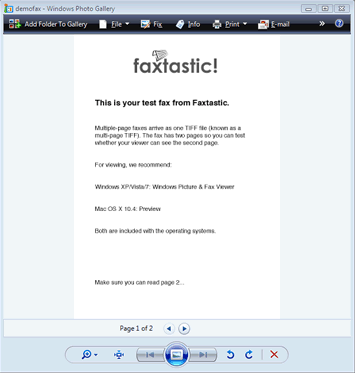
Viewing faxes in Windows Vista or 7. Note the 'page turner' at the bottom.
The current release of Mac OS X comes with an image viewer called 'Preview', which can be found in your Applications folder. This can read multiple-page TIFFs but the method of access can be confusing, leaving the impression that there is only one page.
To see all pages:
- Open the TIFF file in Preview
- Click on 'Drawer'
- Click on the small triangular pointer next to the image
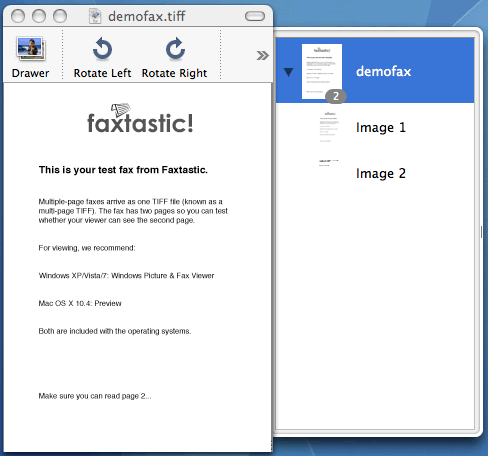
Viewing faxes in Mac OS X
Viewing PDF’s:
There are a lot of PDF viewers out there, however we recommend using the de facto standard Viewer Adobe Reader. It can be downloaded for free here.
Viewing Multipage TIFF’s:
Windows XP comes with a built-in fax viewer that is perfect for the job: Windows Picture and Fax Viewer. By default it is associated with TIFF files, so things should work right away. However, if another application has taken over handling of TIFF files, you'll need to save the file to your hard disk and open it using the viewer.
Alternatively, try IrfanView, a freeware (donation supported) image viewer.
Note for Windows users (all versions) :
If you need to tell Windows to specially open a fax with the viewer, you'll need to Shift+Right-Click on the file, select 'Open With' and select the appropriate viewer.
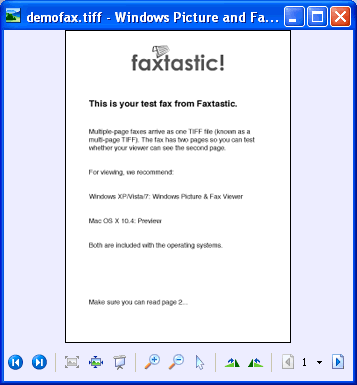
Viewing faxes in Windows XP. Note the 'page turner' in the bottom-right corner.